
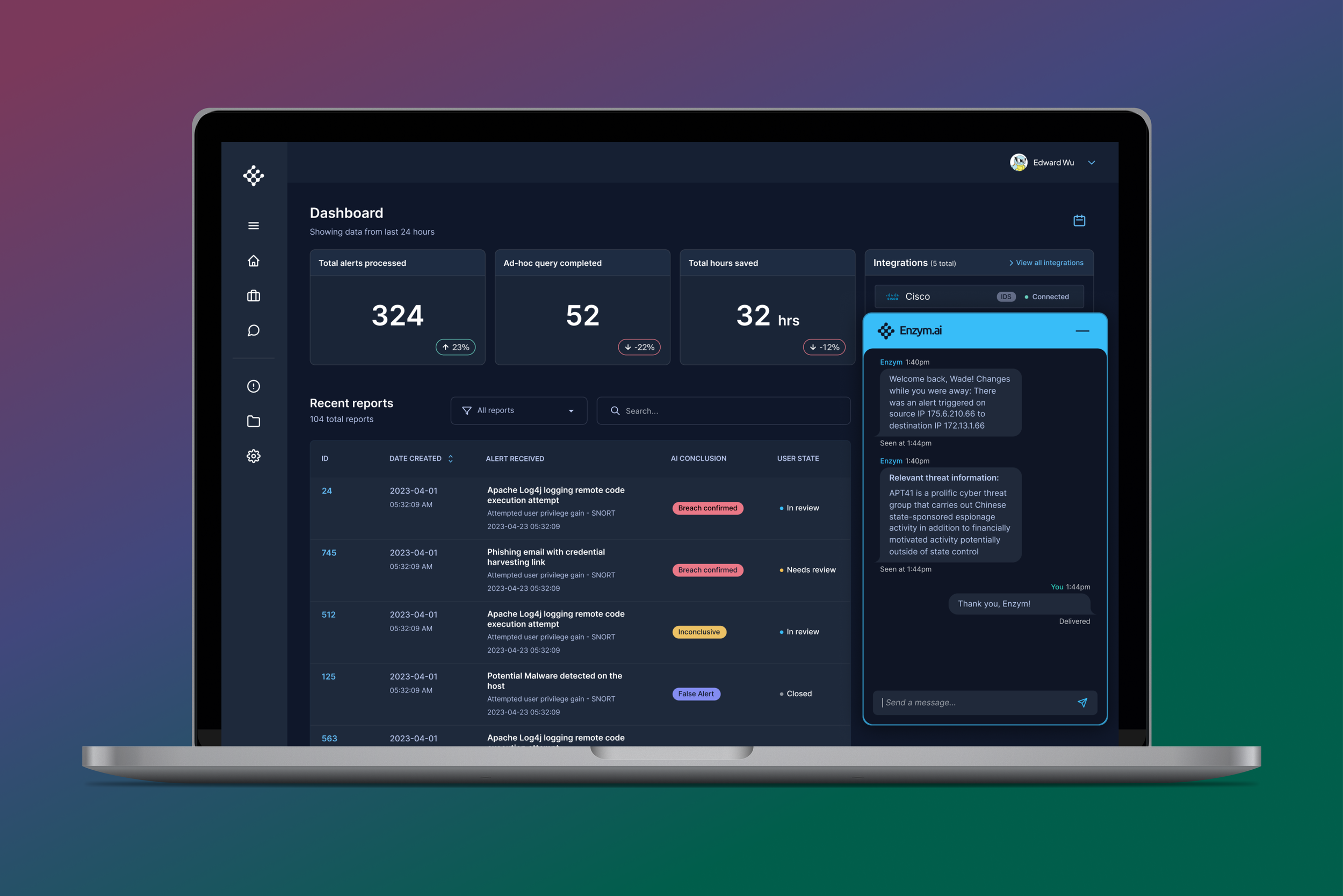
Enzym AI
Designing a platform for human security analysts to collaborate with AI agents
My Role: Product Designer
Client: Enzym AI (now rebranded to Dropzone AI)
Team: Miscreants: Lucas Teixeira (Designer), Sean Sun (Project Manager) | Enzym AI: Edward Wu (Founder) and Alex Burner (Developer)
Tools: Figma
Background
Enzym AI (now Dropzone AI) was founded by security veterans aiming to address emerging cybersecurity threats using LLMs. As AI capabilities advanced, there was a clear opportunity to reduce analyst workload by automating parts of their daily workflows.
While the team had strong technical expertise and a compelling product vision, they needed a design partner to translate that vision into a usable product experience.
With a major cybersecurity conference approaching, Enzym AI needed to quickly deliver a polished, compelling product that could stand out in a crowded landscape of new AI solutions. They partnered with us to design and build the product UI, enabling attendees to interact with and experience the product in real time.
The problem
To better understand the user, I focused on the SOC analyst, a cybersecurity professional responsible for monitoring, analyzing, and responding to security threats as the first line of defense against breaches.
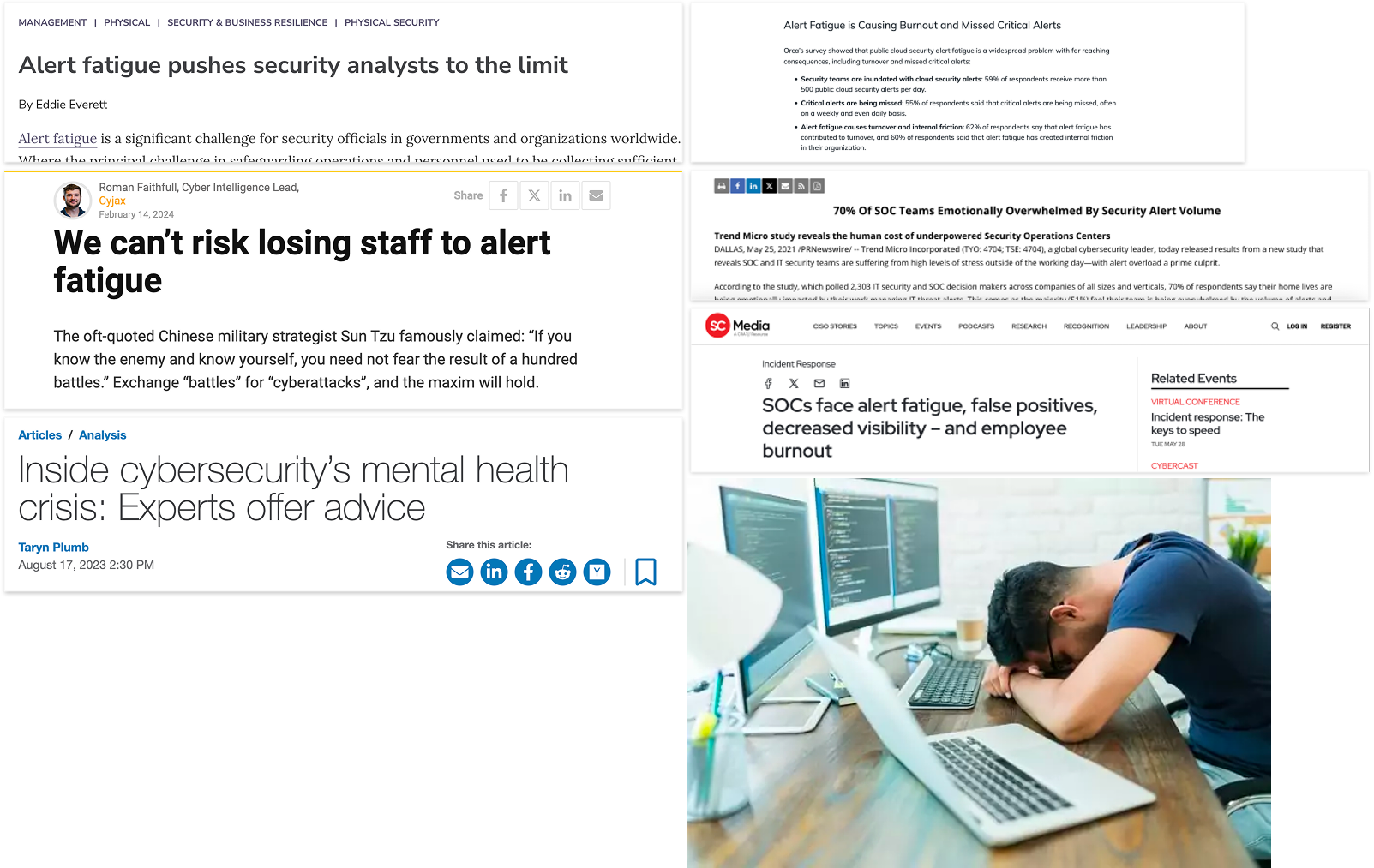
Despite the critical nature of their role, SOC analysts often face severe alert fatigue. With organizations using an average of 45+ security tools (source: IBM), analysts must manage a high volume of daily alerts, most of which are false positives.
This leads to time-consuming investigation workflows, where analysts manually sift through noise to identify real threats. At the same time, they operate under knowledge gaps and high pressure, knowing that missed or delayed responses can lead to serious security incidents.
In the worst-case scenario, fatigue and cognitive overload can cause analysts to miss critical alerts or respond too slowly, increasing the risk of a breach.
Key insights
Through stakeholder conversations, I identified several core challenges SOC analysts face:
Limited confidence across all attack vectors
With the rapid emergence of new threats, especially those enabled by AI, analysts cannot realistically maintain deep expertise in every area. This creates anxiety that knowledge gaps could lead to missed or mishandled attacks.Lack of trust in automated or external reports
Analysts are hesitant to rely on outputs they did not generate themselves. To build trust, they need clear, accessible evidence that allows them to validate findings and understand how conclusions were reached.Fragmented tooling and lack of visibility
Analysts rely on multiple tools to monitor their environment, making it difficult to maintain a unified view of security activity. They need seamless integrations and clear visibility into system status, including when tools are unavailable or failing.
Competitive analysis
After developing a deeper understanding of the SOC analyst’s needs, I evaluated existing solutions to identify opportunities to differentiate our product in the market.
Through this research, I identified three key competitors offering similar security tooling: Expel, Swimlane Turbine, and Arctic Wolf.
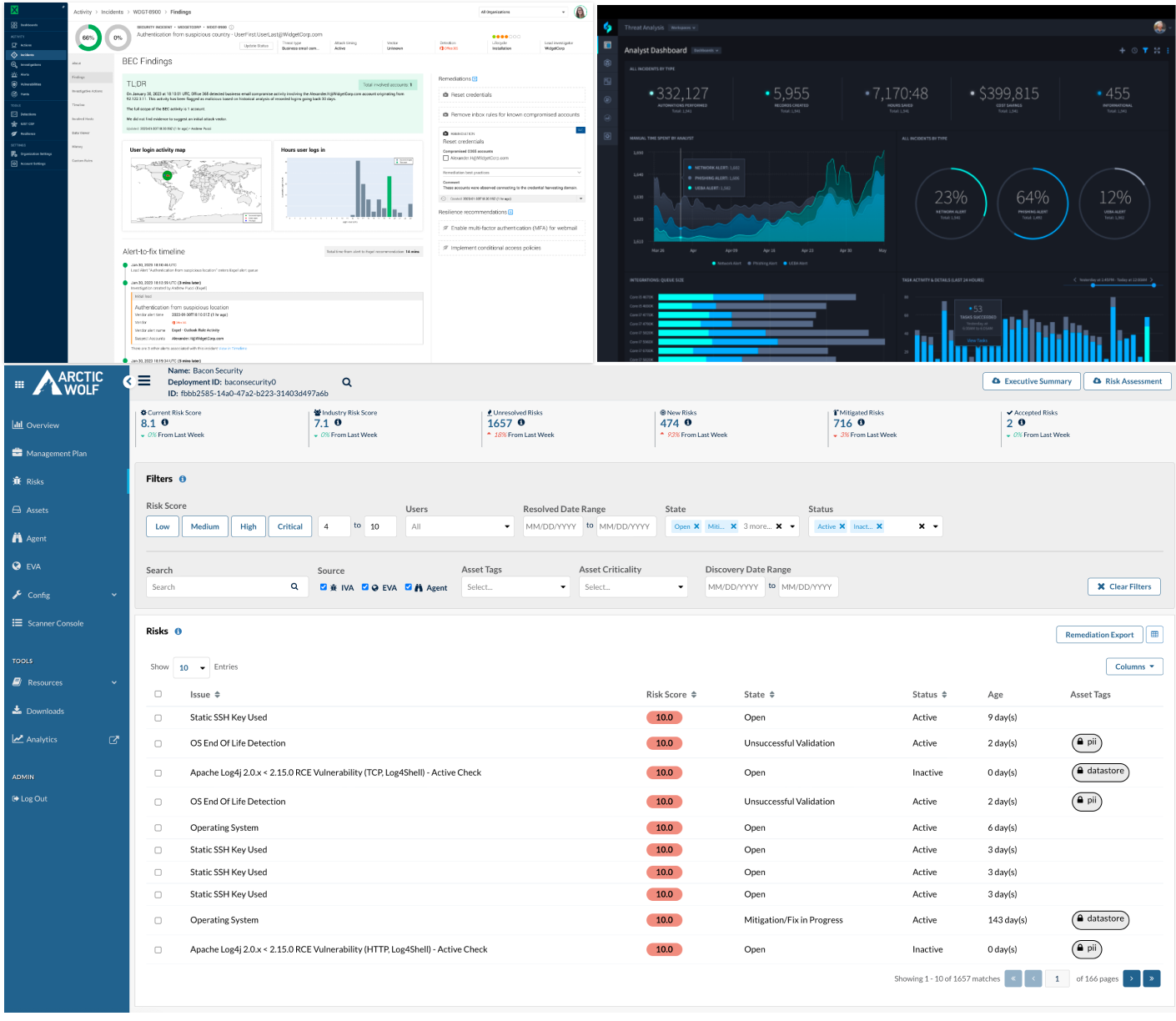
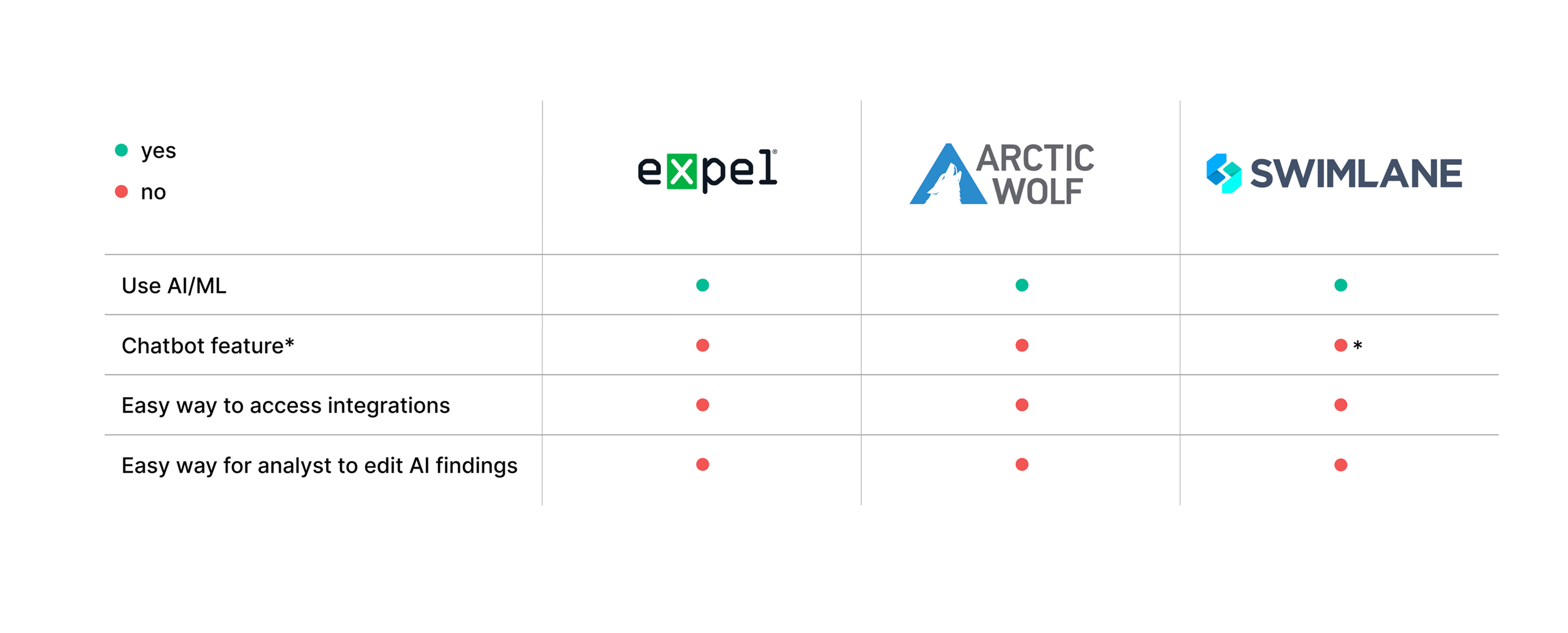
Digging deeper, I conducted a focused competitive analysis and found that while these platforms leverage AI for automated alert triage, they shared several key gaps:
Limited conversational interfaces
None of the tools offered a robust chat-based interaction model, making it harder for analysts to quickly query and explore findings.Difficult access to integrations
Integrations were often buried or fragmented, making it challenging for analysts to understand and manage connected tools.Lack of editability in AI-generated findings
Analysts had little control over AI outputs, with no clear way to review, adjust, or refine findings.
These gaps highlighted an opportunity to differentiate Enzym AI through usability, transparency, and control, guiding my approach to the product experience.
Ideation
With a clear understanding of the target user, market landscape, and product requirements provided by the client, I began exploring how the experience should come together.
I started by mapping a user flow to define how a SOC analyst would navigate the product and complete key tasks. This helped identify critical touchpoints and core screens, ensuring the experience supported efficient investigation and decision-making.

After identifying the key screens, I created an initial dashboard wireframe to explore how analysts would interact with alerts and navigate the investigation workflow.
This iteration focused on enabling users to review alert details, determine whether escalation was needed, and navigate to a dedicated alert page to take action, including approving or rejecting AI-generated findings.
These wireframes helped establish the information hierarchy and relationships between screens, allowing me to validate that the experience supported efficient investigation and decision-making.
Gathering feedback
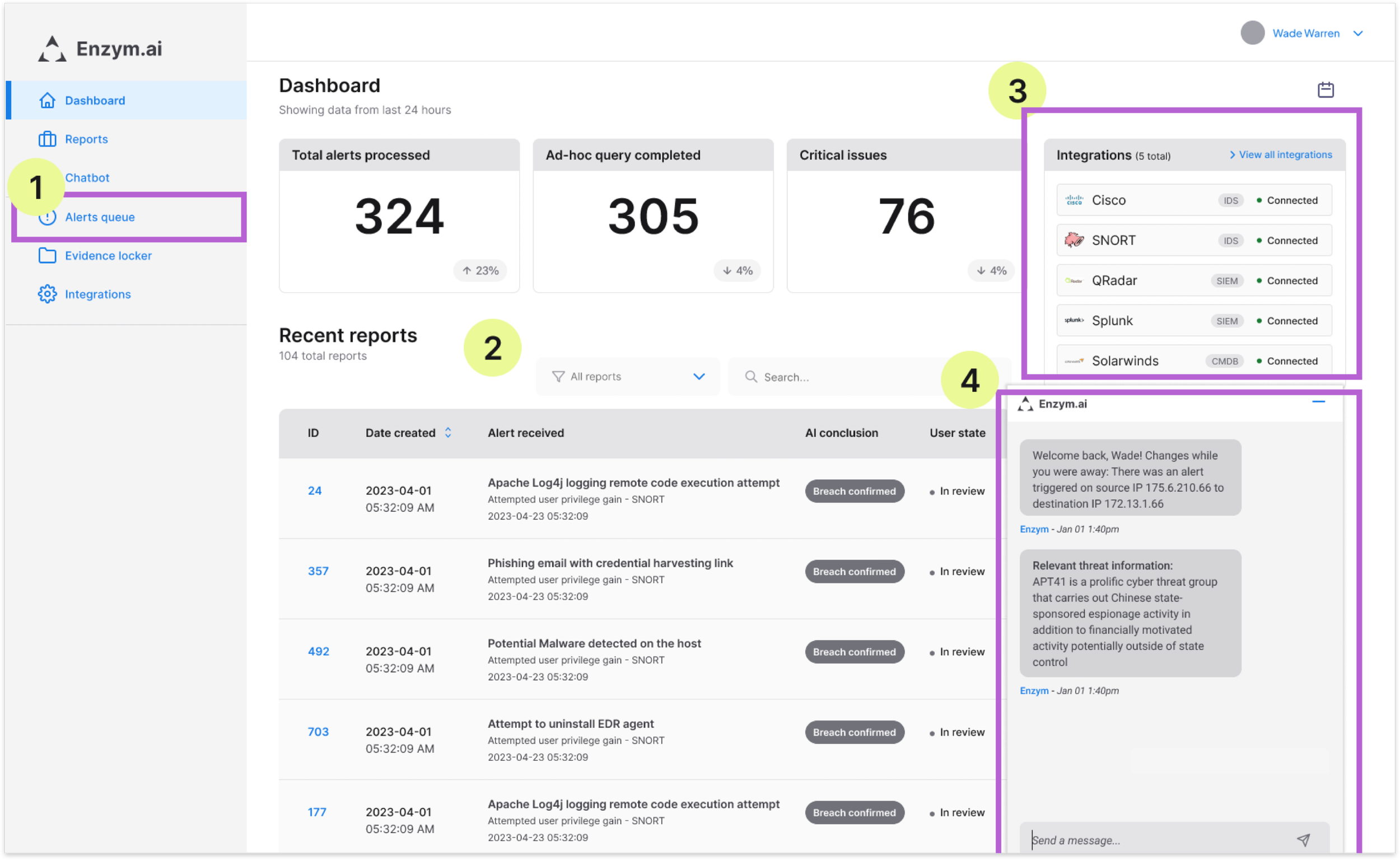
After creating the initial wireframes, I gathered internal and external feedback to validate the direction and identify areas for improvement.
These sessions surfaced four key opportunities to better support analyst workflows:
Added an alert queue to the navigation
Enabled analysts to quickly view and access pending investigations, improving visibility into active work.Introduced filtering capabilities
Allowed analysts to sort and prioritize alerts, supporting faster triage in high-volume environments.Surfaced integration details within the dashboard
Reduced context switching by making integration information directly accessible. Removed “total time saved”, as it did not provide meaningful value to users.Made the chat interface collapsible
Gave analysts more control over their workspace, helping reduce cognitive load and visual clutter.
Key screens
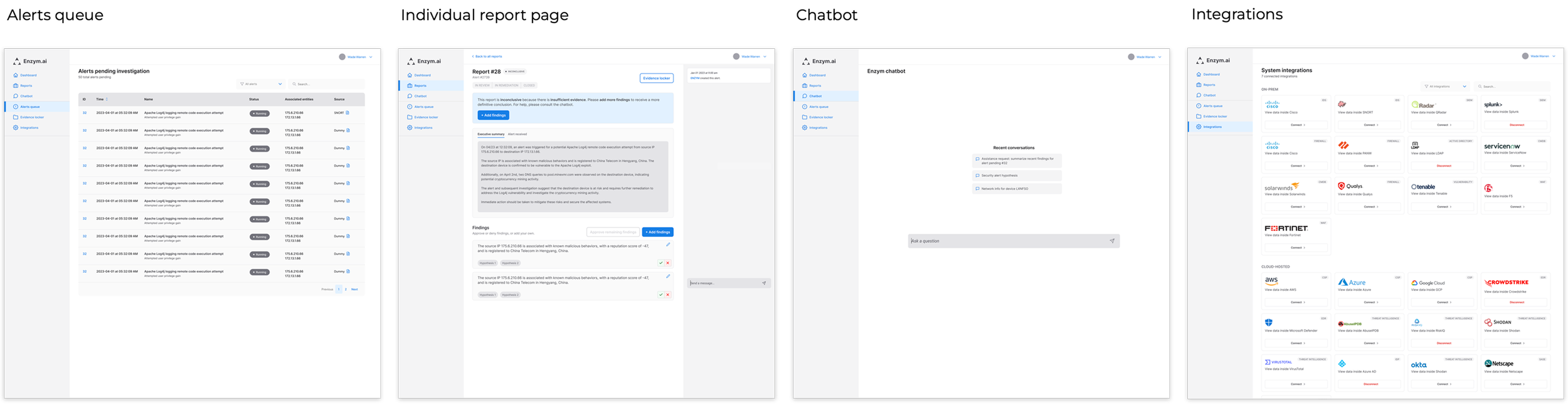
After aligning with the developer and product manager on the dashboard, I expanded the experience by designing the remaining key screens to support the full investigation workflow:
Alert Queue
Provides a centralized view of ongoing investigations, allowing analysts to track progress and manage active work.Reports
Surfaces alert outcomes such as true positives, false positives, true negatives, and false negatives, giving analysts visibility into system performance and detection accuracy.Chat Interface
A dedicated space where analysts can interact with the AI agent, request updates, and explore findings in a more flexible, conversational way.Integrations
Enables users to connect new data sources, configure existing integrations, and monitor connection status, ensuring visibility across their security tooling.
Design system
After validating the wireframes with design and engineering stakeholders, we aligned on the approach for bringing the product to life visually.
Given the tight timeline, we chose to leverage an existing design system rather than building one from scratch. The engineering team was already familiar with DaisyUI, a Tailwind CSS component library, which allowed us to move quickly and maintain development efficiency.
We selected the night theme, a dark mode palette commonly used in security tools, to align with SOC analyst expectations. At the same time, its use of vibrant accent colors helped differentiate the product and support a more distinct visual identity.
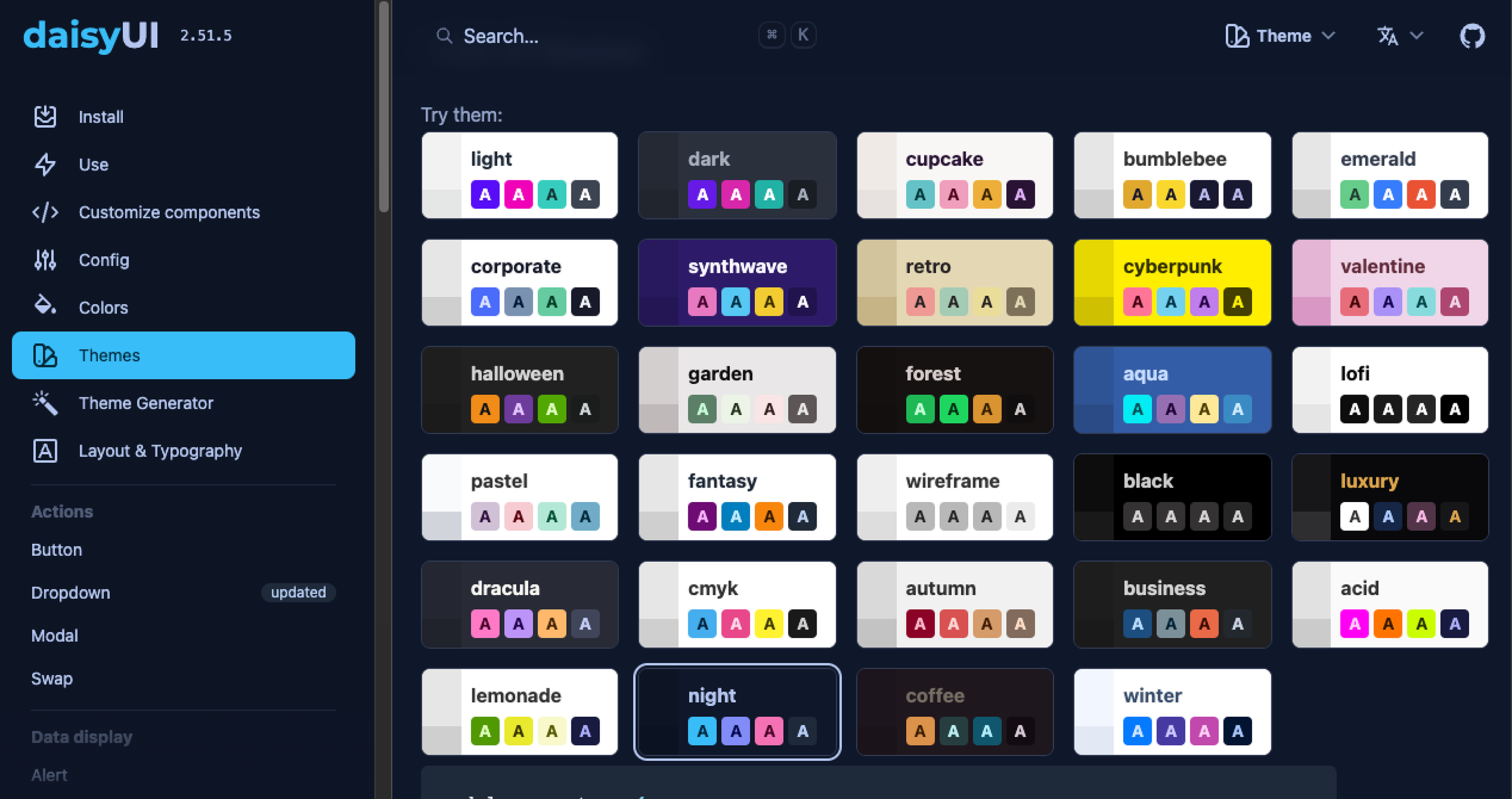
I began applying the DaisyUI night theme components to establish a consistent visual foundation for the product.
For components not available within DaisyUI, I referenced Google’s Material Design system to guide structure, behavior, and interaction patterns, ensuring consistency across the experience.
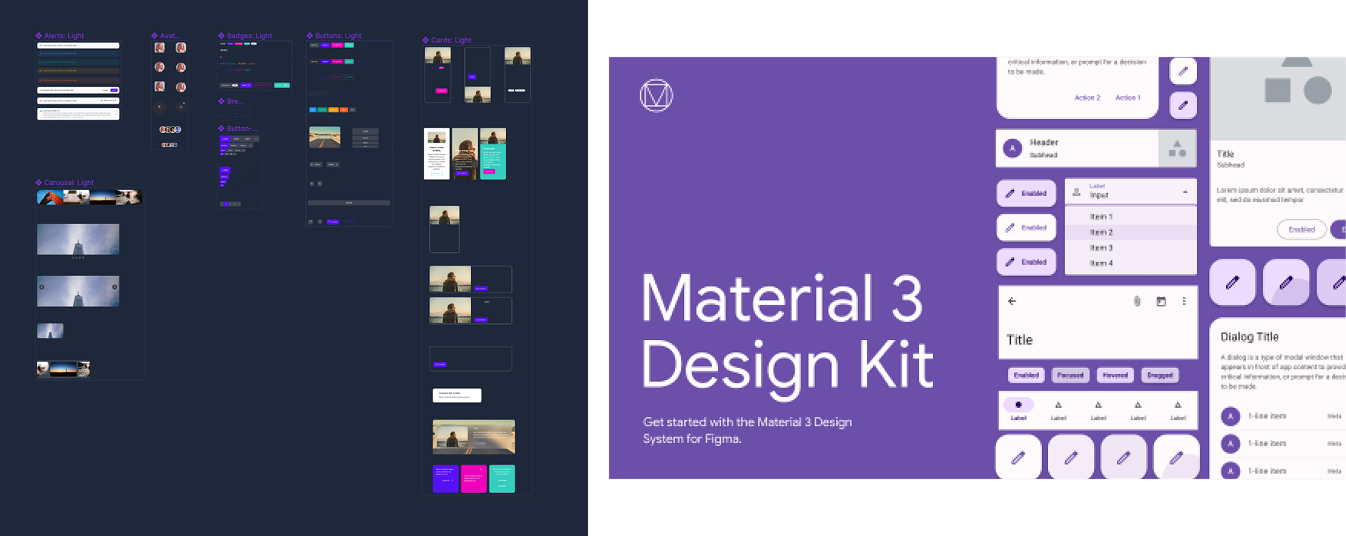
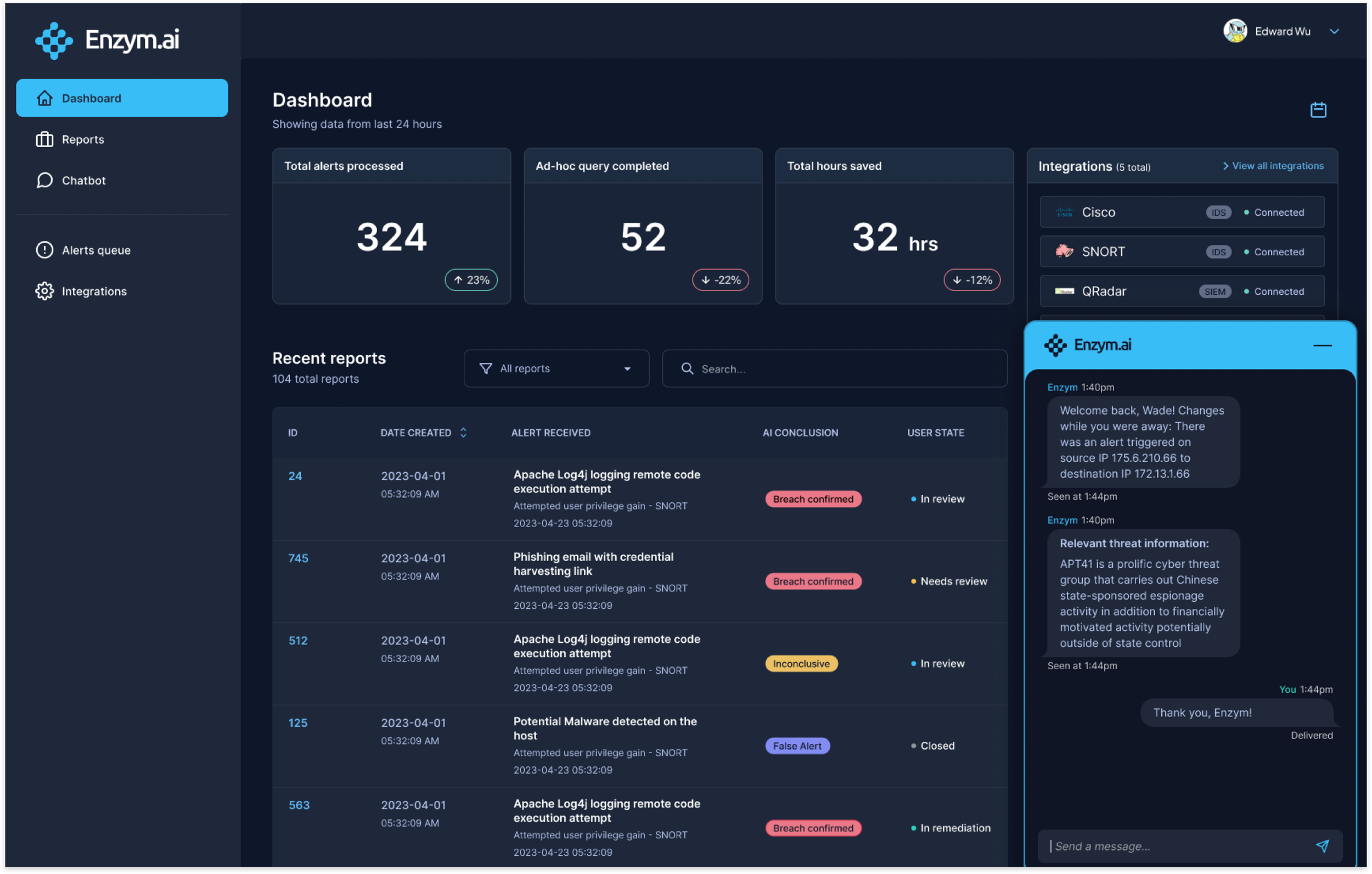
Using DaisyUI and Google’s Material Design system as references, I first developed a high-fidelity version of the dashboard to establish the overall look and feel of the product.
This served as a foundation for scaling visual patterns across the rest of the experience.
Building high-fidelity prototypes was critical to creating a realistic, testable experience, allowing us to gather more meaningful feedback during usability testing.
Prototyping
This prototype demonstrates how analysts can collapse the chat interface, select date ranges using the calendar, and filter reports by type, supporting more efficient exploration and analysis.
This scenario demonstrates how the system handles a false negative alert. An employee forgot their password and triggered multiple login attempts, which the system flagged as suspicious.
The SOC analyst can review the report, validate AI-generated findings, and drill into specific details as needed. They can then confirm or adjust the findings, helping improve the system over time, before closing the alert.
The video below illustrates this workflow in action.
Launch & outcomes
After finalizing the high-fidelity designs, I conducted both internal and external testing to validate the experience. Because I had collaborated closely with engineering throughout the process, most feedback at this stage was minor and iterative, primarily focused on visual refinements.
I delivered the final designs as annotated Figma prototypes, clearly documenting expected interactions and behaviors to support a smooth handoff to development. The engineering team then built the product, which was successfully launched and showcased at a major cybersecurity conference.
Impact
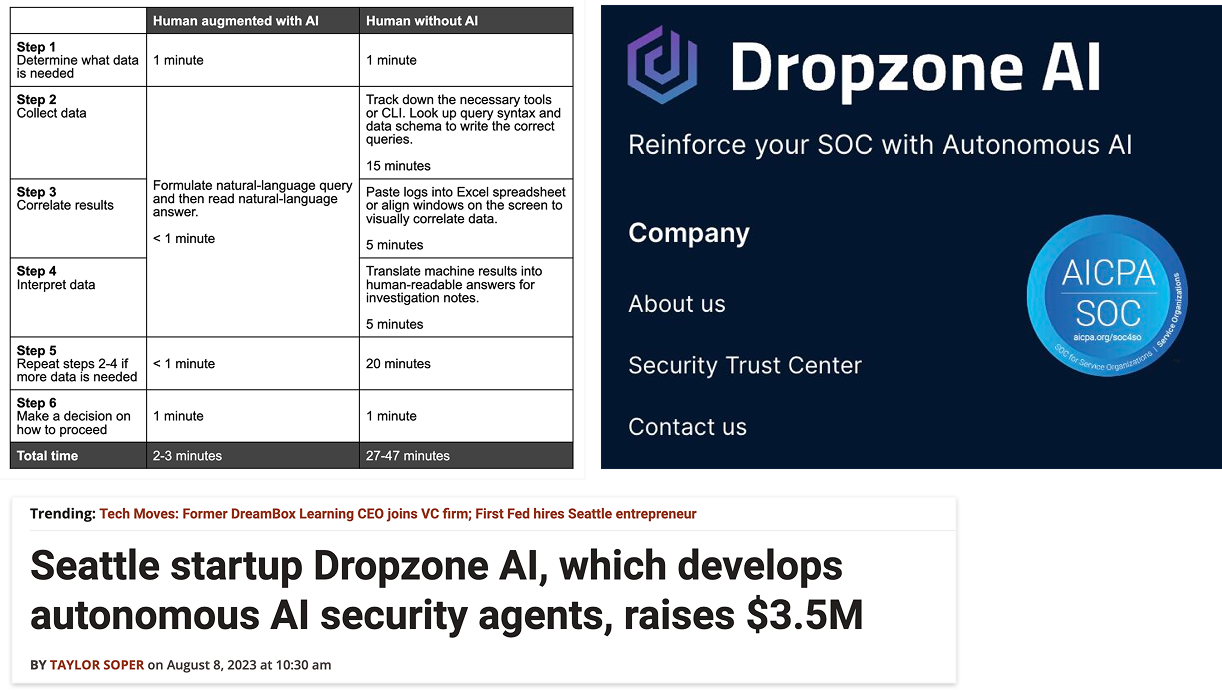
Reduced investigation time from 27–47 minutes to 2–3 minutes through streamlined workflows and improved access to information
Supported the company in securing $3.5M in seed funding
Continued collaboration led to an ongoing design partnership, including additional work on their marketing experience
The product achieved SOC 2 certification, establishing credibility as a trusted security tool
Following launch, we continued to gather feedback from real users in production environments, iterating on the experience to further improve usability and performance.
Reflection
If I were to approach this project again, I would:
Invest more deeply in user research to better understand analyst motivations, behaviors, and decision-making
Allocate more time to expand and formalize the design system for greater scalability and consistency
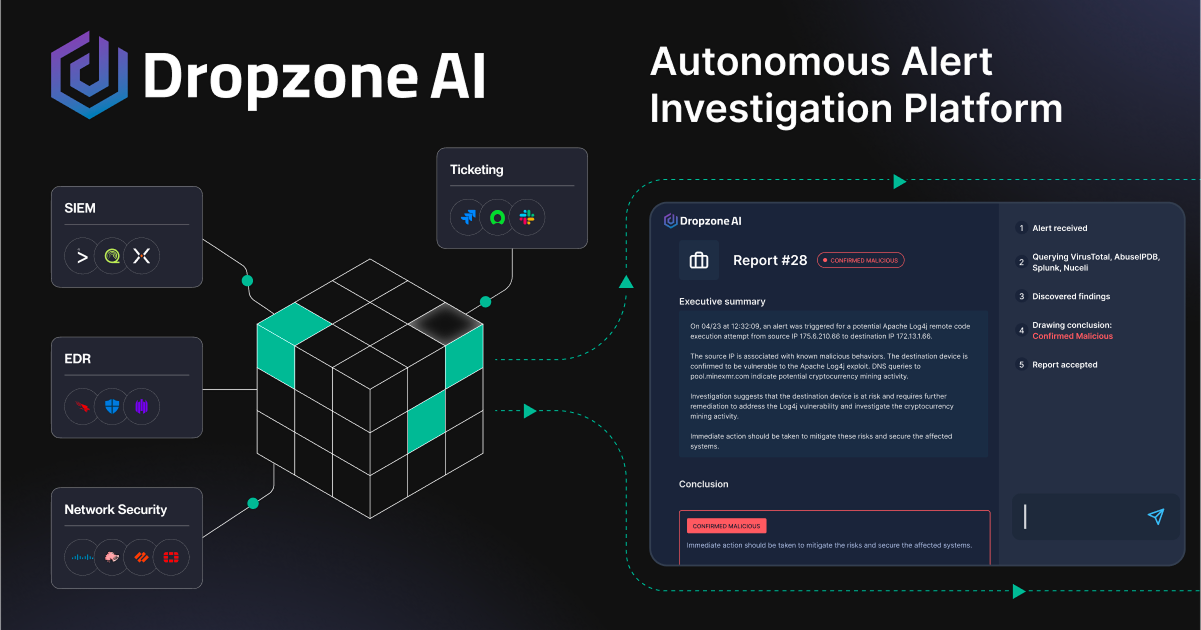
Fun fact: I also worked on v1.0 of their branding website! Here’s an illustration I created with another designer from my team